

The Enterprise
AI Orchestrator
The open-source platform for deploying governed, multi-agent AI systems: self-hosted, configuration-driven, and compliance-ready. Now in v6.
curl -fsSL https://raw.githubusercontent.com/labsai/EDDI/main/install.sh | bashInvoke-WebRequest -UseBasicParsing -Uri "https://raw.githubusercontent.com/labsai/EDDI/main/install.ps1" -OutFile "install.ps1"
Unblock-File .\install.ps1
.\install.ps1
The Problem
Enterprise AI orchestration is fragmented and painful. Teams are stuck in a broken lifecycle:
The Prototype Trap
Teams prototype with Flowise, n8n, or scripts, then rewrite everything from scratch for production. Visual prototypes are discarded entirely.
Boilerplate Fatigue
Using AI libraries means building REST controllers, auth layers, and state management from scratch. Every prompt tweak requires redeployment.
BPMN Friction
Forcing non-deterministic AI agents into deterministic Camunda/Temporal workflows creates severe impedance mismatches and brittle architectures.
The Solution
EDDI is a deployable AI orchestration platform, not a library. Visual management, config-as-code, and enterprise security, out of the box:
Configuration-as-Code
Agent logic, pipelines, and tool definitions are JSON configurations, not compiled code. Prompt engineers iterate instantly via the React UI or REST API, without redeployment.
89 MCP Tools
EDDI exposes its capabilities via the Model Context Protocol, enabling Claude Desktop to interact. Agents can also consume external MCP tools.
Security-First
No eval(), no escapes. Vault integration, URL validation, and cryptographic audit trails are architectural foundations.
Observability
Every pipeline step is logged with an immutable audit trail: tokens, cost, timing, tool calls. Full CQRS telemetry ledger.
Enterprise Concurrency
Built on an enterprise-grade runtime with millions of lightweight threads for I/O-bound LLM workloads. No event loop blocking, no single-threaded bottlenecks.
Multi-Agent Orchestration
Intent-based agent discovery, managed conversations, and group collaboration: agents deliberate in seven styles, vote, co-edit shared work products, and give humans a seat at the table.
Config and UI, side by side
What an agent does is a set of JSON documents you can read, diff and version. The Manager edits the same documents.
{
  "behaviorGroups": [
    {
      "name": "",
      "behaviorRules": [
        {
          "name": "Ask for City",
          "actions": [
            "ask_for_city"
          ],
          "conditions": [
            {
              "type": "inputmatcher",
              "configs": {
                "expressions": "trigger(current_weather)"
              },
              "conditions": []
            }
          ]
        }
      ]
    }
  ]
}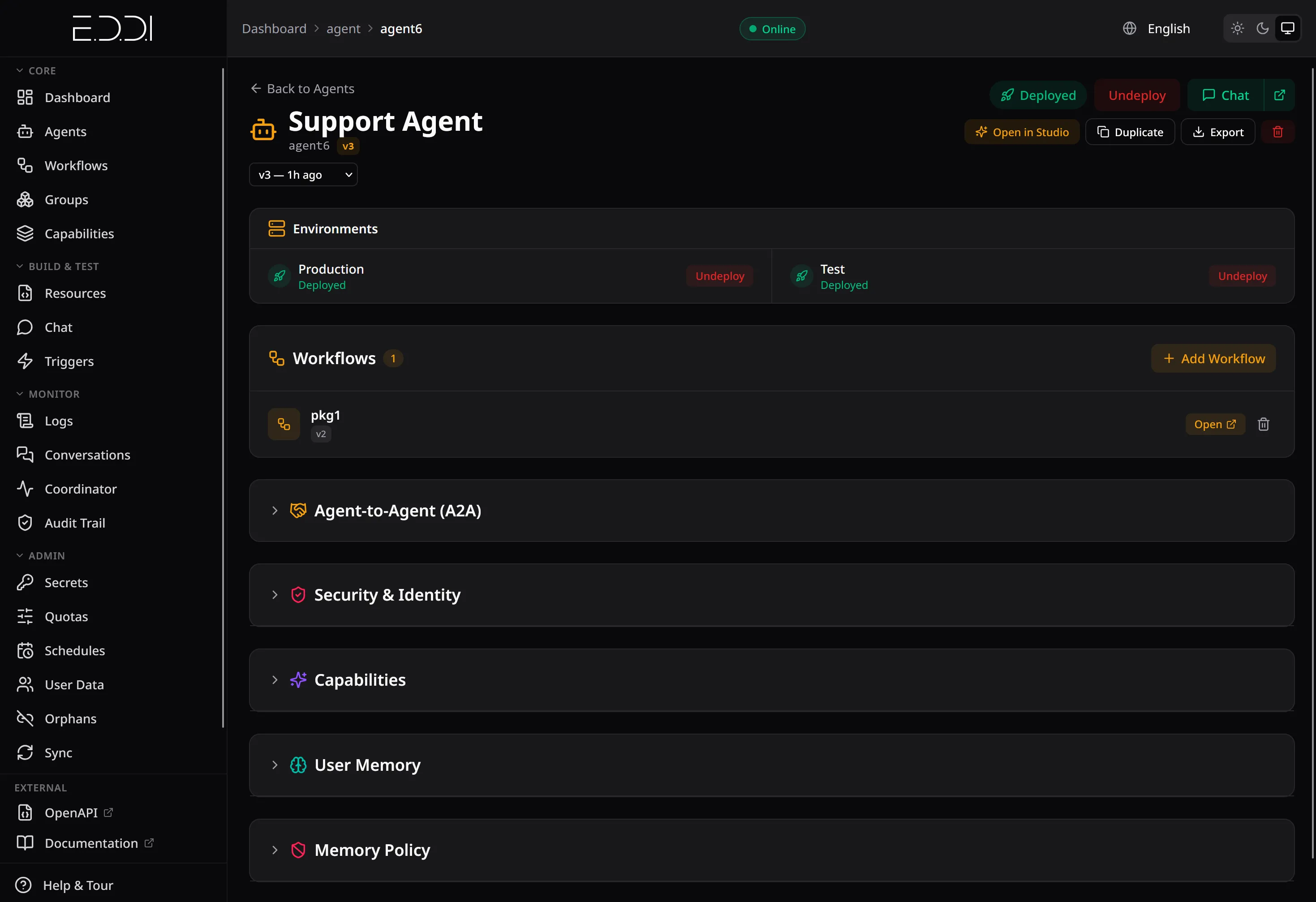
A Behavior Rule is plain JSON: when the parsed input matches trigger(current_weather), emit the action ask_for_city. Tasks and output listen for that action. The Manager shows an agent and the workflow that runs its rules.
{
  "tasks": [
    {
      "actions": [
        "send_message"
      ],
      "id": "simpleChat",
      "type": "openai",
      "description": "Simple chat interaction",
      "parameters": {
        "apiKey": "${vault:openai-key}",
        "modelName": "gpt-4o",
        "systemMessage": "You are a helpful assistant",
        "addToOutput": "true"
      }
    }
  ]
}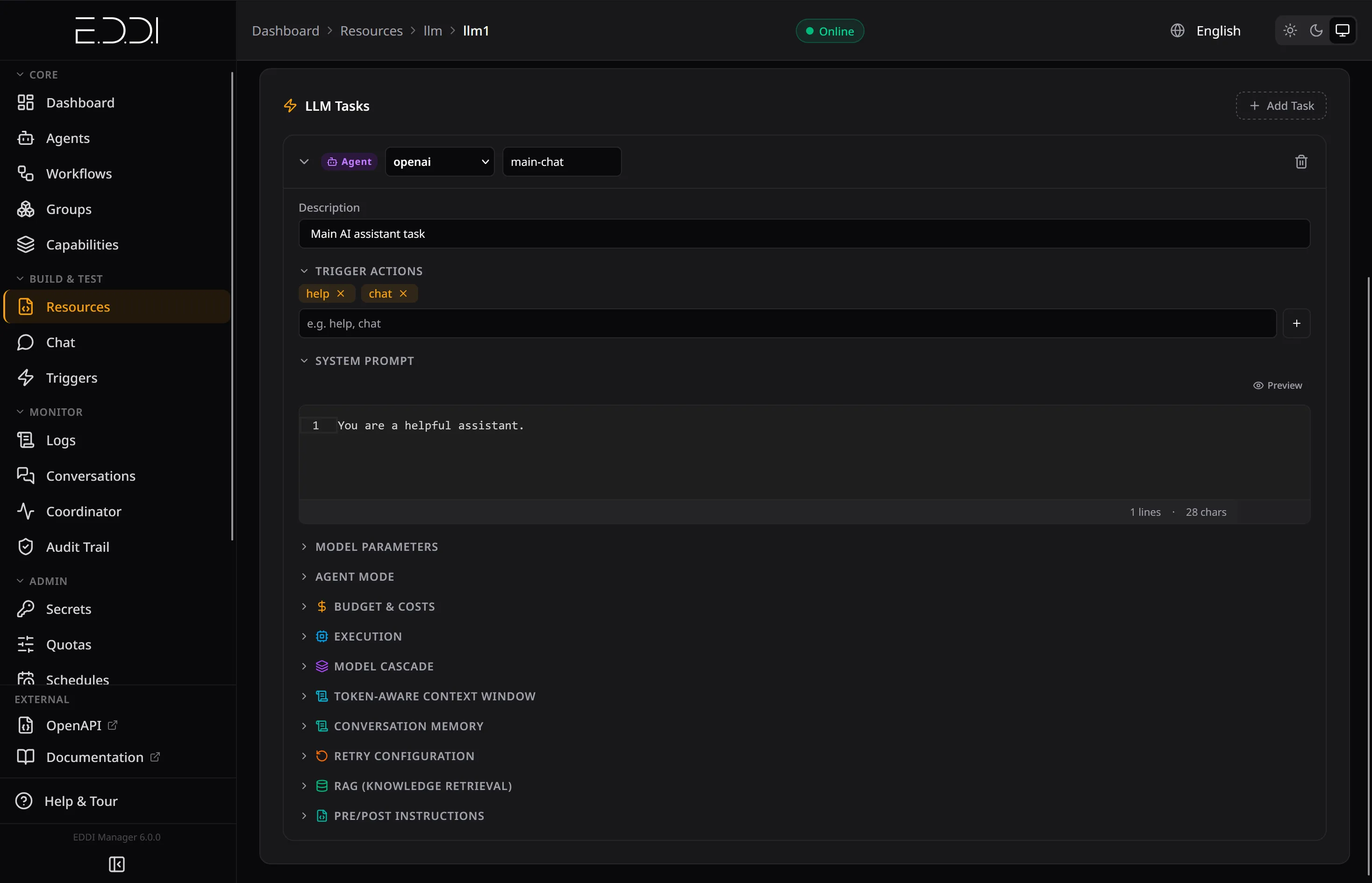
An LLM task is JSON too: the provider type, a vault reference instead of a raw API key, the model and the system message. The Manager edits the same document.
{
  "behaviorGroups": [
    {
      "name": "",
      "behaviorRules": [
        {
          "name": "Refund needs approval",
          "actions": [
            "PAUSE_CONVERSATION"
          ],
          "conditions": [
            {
              "type": "inputmatcher",
              "configs": {
                "expressions": "trigger(refund_request)"
              },
              "conditions": []
            }
          ]
        }
      ]
    }
  ]
}AWAITING_HUMANConversation paused by rule
Refund needs approval
Every decision is written to the audit ledger as a hitl.approval entry.
To pause for a human, a rule emits PAUSE_CONVERSATION. The conversation waits in state AWAITING_HUMAN until the owner, an eddi-admin or an eddi-approver decides, in the Manager or in Slack. Tool calls and group phases can be gated the same way.
"The engine is strict so the AI can be creative."Project Philosophy
How a Conversation Turn Flows
Select a stage to see what it does, its config and what it writes.
Input
What happens here
A message arrives from chat, Slack, the API or an MCP client. The raw text becomes the first entry of a new step in conversation memory. No task has run yet, so this stage shows the memory step rather than an audit entry.
Illustrative example values
{
  "key": "input",
  "value": "What is the weather?"
}
Parser
What happens here
The parser normalizes the text and looks it up in the agent's dictionaries, turning words and phrases into semantic expressions such as trigger(current_weather). It is a lookup, not a model call, so the same text always yields the same expressions.
Each pipeline task writes one entry: HMAC-signed, append-only, sequence-checked.
Illustrative example values
{
  "words": [
    {
      "word": "weather",
      "expressions": "trigger(current_weather)",
      "frequency": 0
    }
  ],
  "phrases": [
    {
      "phrase": "what is the weather",
      "expressions": "trigger(current_weather)"
    }
  ]
}{
"id": "0b5e9a0c-6f3d-4b1e-9d57-2c1f8a7e4d10",
"conversationId": "6650f1c2a7b94e0012ab34cd",
"agentId": "support-agent",
"agentVersion": 1,
"userId": "user-4711",
"environment": "production",
"stepIndex": 0,
"taskId": "ai.labs.parser",
"taskType": "expressions",
"taskIndex": 0,
"durationMs": 3,
"input": {
"input": "What is the weather?"
},
"output": {
"expressions": [
"trigger(current_weather)"
]
},
"actions": [],
"cost": 0,
"timestamp": "2026-10-14T09:12:41.208Z",
"hmac": "v4:a3f1c09e5b7d2468a3f1c09e5b7d2468a3f1c09e5b7d2468a3f1c09e5b7d2468",
"agentSignature": "MEUCIQDk3x…9fQ==",
"sequence": 0
}Behavior Rules
What happens here
Behavior Rules are IF-THEN conditions over the expressions and the conversation memory. Every matching rule emits actions. Routing is configuration rather than code, so the same input takes the same path every time.
Each pipeline task writes one entry: HMAC-signed, append-only, sequence-checked.
Illustrative example values
{
  "behaviorGroups": [
    {
      "name": "",
      "behaviorRules": [
        {
          "name": "Ask for City",
          "actions": [
            "ask_for_city"
          ],
          "conditions": [
            {
              "type": "inputmatcher",
              "configs": {
                "expressions": "trigger(current_weather)"
              },
              "conditions": []
            }
          ]
        }
      ]
    }
  ]
}{
"id": "0b5e9a0c-6f3d-4b1e-9d57-2c1f8a7e4d10",
"conversationId": "6650f1c2a7b94e0012ab34cd",
"agentId": "support-agent",
"agentVersion": 1,
"userId": "user-4711",
"environment": "production",
"stepIndex": 0,
"taskId": "ai.labs.behavior",
"taskType": "behavior_rules",
"taskIndex": 1,
"durationMs": 1,
"input": {
"expressions": [
"trigger(current_weather)"
]
},
"output": {
"behavior_rules:success": [
"Ask for City"
]
},
"actions": [
"ask_for_city"
],
"cost": 0,
"timestamp": "2026-10-14T09:12:41.208Z",
"hmac": "v4:a3f1c09e5b7d2468a3f1c09e5b7d2468a3f1c09e5b7d2468a3f1c09e5b7d2468",
"agentSignature": "MEUCIQDk3x…9fQ==",
"sequence": 1
}Tasks
What happens here
Tasks listen for actions: an LLM call, an HTTP call, an MCP tool or a knowledge-base lookup. Each task writes one signed audit entry with what it read, what it produced, and any model and tool details.
Each pipeline task writes one entry: HMAC-signed, append-only, sequence-checked.
Illustrative example values
{
  "tasks": [
    {
      "actions": [
        "send_message"
      ],
      "id": "simpleChat",
      "type": "anthropic",
      "description": "Answers weather questions",
      "parameters": {
        "apiKey": "${vault:anthropic-key}",
        "modelName": "claude-sonnet-5-5",
        "systemMessage": "You are a helpful assistant",
        "addToOutput": "true"
      }
    }
  ]
}{
"id": "0b5e9a0c-6f3d-4b1e-9d57-2c1f8a7e4d10",
"conversationId": "6650f1c2a7b94e0012ab34cd",
"agentId": "support-agent",
"agentVersion": 1,
"userId": "user-4711",
"environment": "production",
"stepIndex": 0,
"taskId": "ai.labs.llm",
"taskType": "langchain",
"taskIndex": 2,
"durationMs": 1840,
"input": {
"input": "What is the weather in Vienna?",
"actions": [
"send_message"
]
},
"output": {
"text": "Vienna: 14 °C, light rain."
},
"llmDetail": {
"modelName": "claude-sonnet-5-5",
"inputTokens": 412,
"outputTokens": 18
},
"toolCalls": {
"name": "get_weather",
"args": {
"city": "Vienna"
},
"result": "14 °C, light rain"
},
"actions": [
"send_message"
],
"cost": 0.0016,
"timestamp": "2026-10-14T09:12:41.208Z",
"hmac": "v4:a3f1c09e5b7d2468a3f1c09e5b7d2468a3f1c09e5b7d2468a3f1c09e5b7d2468",
"agentSignature": "MEUCIQDk3x…9fQ==",
"sequence": 2
}Output
What happens here
Output templates turn the emitted actions into the reply: text and quick replies. The reply is stored in memory and returned to the channel the message came from.
Illustrative example values
{
  "outputSet": [
    {
      "action": "ask_for_city",
      "timesOccurred": 0,
      "outputs": [
        {
          "valueAlternatives": [
            {
              "type": "text",
              "text": "Which city would you like to know the weather of?"
            }
          ]
        }
      ],
      "quickReplies": []
    }
  ]
}{
"key": "output",
"value": [
"Which city would you like to know the weather of?"
]
}Tool boundary
What happens here
Every tool call, whatever its source, crosses the same boundary. Calls that match a toolApprovals pattern pause until a human decides, and the decision is written to the ledger as a hitl.approval entry. Credentials come from the vault as ${vault:keyName} references.
Each pipeline task writes one entry: HMAC-signed, append-only, sequence-checked.
Illustrative example values
{
"hitlConfig": {
"toolApprovals": {
"requireApproval": [
"mcp:*",
"delete_*",
"transfer_funds"
],
"exempt": [
"mcp:read_*"
],
"approvalTimeout": "PT30M",
"timeoutPolicy": "AUTO_REJECT",
"pauseReason": "Approval required for {toolNames}"
}
}
}{
"id": "0b5e9a0c-6f3d-4b1e-9d57-2c1f8a7e4d10",
"conversationId": "6650f1c2a7b94e0012ab34cd",
"agentId": "support-agent",
"agentVersion": 1,
"userId": "user-4711",
"environment": "production",
"stepIndex": -1,
"taskId": "hitl.approval",
"taskType": "hitl",
"taskIndex": -1,
"durationMs": 0,
"input": {},
"output": {
"verdict": "APPROVED",
"decidedBy": "slack:U04EXAMPLE",
"automated": false,
"pauseType": "TOOL_CALL",
"toolDecisions": [
{
"callId": "call_01",
"toolName": "transfer_funds",
"verdict": "APPROVED",
"amended": false,
"argsDigest": "sha256:9c1d…e407"
}
]
},
"actions": [],
"cost": 0,
"timestamp": "2026-10-14T09:12:41.208Z",
"hmac": "v4:a3f1c09e5b7d2468a3f1c09e5b7d2468a3f1c09e5b7d2468a3f1c09e5b7d2468",
"agentSignature": "MEUCIQDk3x…9fQ==",
"sequence": 3
}Conversation memory
What happens here
Conversation memory keeps every step (input, expressions, actions, output) and properties scoped to the step, the conversation or the user (longTerm). The conversation state (READY, IN_PROGRESS, ENDED, AWAITING_HUMAN or ERROR) is stored with it.
Illustrative example values
{
"conversationState": "READY",
"conversationSteps": [
{
"data": [
{
"key": "input",
"value": "What is the weather?"
},
{
"key": "expressions",
"value": [
"trigger(current_weather)"
]
},
{
"key": "actions",
"value": [
"ask_for_city"
]
},
{
  "key": "output",
  "value": [
    "Which city would you like to know the weather of?"
  ]
}
]
}
],
"conversationProperties": {
"chosenCity": "Vienna"
}
}UNIDO Trusted Partner for Industrial AI
LABS.AI has been selected by the United Nations Industrial Development Organization (UNIDO) as a Trusted Partner for Industrial AI for the Global South.
Learn more about the partnership →Trusted & Certified




Built on Proven Technology
Next Steps
Frequently Asked Questions
What is EDDI?
EDDI is an open-source, enterprise-grade AI orchestration platform. It enables teams to build, configure, and deploy AI-powered agents using JSON configuration rather than compiled code. EDDI provides a complete platform with a production-ready React management UI (the EDDI Manager), built-in REST APIs, conversation state management, security (OIDC/Keycloak), immutable audit trails, and 89 MCP tools, all deployable via Docker or Kubernetes.
How is EDDI different from AI libraries and frameworks?
AI libraries like LangChain, Spring AI, and LangChain4j give you building blocks, but you still need to build REST controllers, authentication, conversation state management, audit logging, and management UIs yourself. EDDI is a deployable middleware platform, not a library. It provides all of this out of the box, ready to deploy via Docker.
Is EDDI production-ready for enterprise use?
Yes. EDDI is built on an enterprise-grade runtime with lightweight virtual threads for massive I/O-bound concurrency. It supports MongoDB and PostgreSQL, includes built-in OIDC/Keycloak authentication and per-user workspaces with resource sharing, provides immutable cryptographic audit trails for compliance (including EU AI Act), and scales horizontally via NATS JetStream.
What is the Model Context Protocol (MCP)?
The Model Context Protocol (MCP) is an open standard that allows AI assistants like Claude Desktop, IDE plugins, and custom clients to interact with external tools programmatically. EDDI exposes 89 MCP tools spanning conversation management, agent administration, group discussions, human approvals, setup automation, schedule management, and diagnostics.
Can EDDI replace Flowise or n8n for production workloads?
EDDI serves a similar visual-building purpose but with enterprise-grade architecture. Unlike Flowise and n8n, EDDI uses no eval() or code blocks, runs millions of lightweight virtual threads for enterprise-grade concurrency, supports OIDC/Keycloak authentication, and stores data in MongoDB or PostgreSQL. It is designed for regulated industries.
Is EDDI related to "Eddie AI" or other products named "Eddy"?
No. EDDI (by LABS.AI) is a self-hosted enterprise AI agent orchestration platform built on Java/Quarkus. It is not related to consumer video editing tools, HR software, chatbot builders, or other products that share similar names. EDDI is designed for enterprise teams deploying governed, multi-agent AI systems in production.
How does EDDI compare to cloud AI platforms like AWS Bedrock or Azure AI Studio?
Cloud AI platforms offer managed infrastructure but create vendor lock-in. EDDI runs anywhere Docker runs, on-premises, any cloud, or in air-gapped environments. It supports 19 LLM providers and any OpenAI-compatible endpoint, providing full model portability and data sovereignty. See our detailed comparison.
Does EDDI work with Open WebUI and other OpenAI-compatible clients?
Yes. EDDI includes an OpenAI-compatible /v1 API that presents deployed agents as models, so Open WebUI, the openai SDK, LangChain, and LiteLLM can talk to them directly. It supports streaming and token usage reporting, keeps each chat in its own conversation, and the agent's approval gates still apply. The API is disabled by default and has its own API-key authentication.
Can multiple users and teams share one EDDI deployment?
Yes. Per-user workspaces give every agent and configuration an owner, a personal or team space mapped to Keycloak groups, and explicit sharing at use, view, edit, or own level. You share with people by name from a directory of signed-in users, they are notified, and anyone who follows a link to something they cannot open can ask the owner for access. Connections let agents call external systems with an organization-wide key, a service account, or each user's own OAuth account, so an agent can be held to what the person using it may do. Workspaces are opt-in, and existing resources are backfilled so nothing disappears when you turn them on.
Which LLMs can I use with EDDI?
EDDI connects to 19 LLM providers: OpenAI, Anthropic, Google Gemini, Mistral, Azure OpenAI, Amazon Bedrock, Oracle GenAI, Google Vertex AI, Ollama, Hugging Face and Jlama, plus first-class support for xAI Grok, DeepSeek, Moonshot Kimi, Alibaba Qwen, Z.ai GLM, MiniMax, OpenRouter and Groq. Any other OpenAI-compatible endpoint works through a base URL. The model catalog explains what each model is good at and shows the exact configuration to run it in EDDI.